> For the complete documentation index, see [llms.txt](https://support.keyst.one/llms.txt). Markdown versions of documentation pages are available by appending `.md` to page URLs; this page is available as [Markdown](https://support.keyst.one/traditional-chinese/gao-ji-gong-neng/dao-chu-btc-de-kuo-zhan-gong-yue-xpub.md).
# 導出 BTC 的擴展公鑰(XPUB)
在基於 UTXO 的加密貨幣中,找零地址用於將超出預期收款地址的多餘金額發回。 XPUB 是您硬件錢包的擴展公鑰,用於生成所有的公鑰地址,包括收款地址和找零地址,不暴露私鑰。
導出 XPUB 可以讓您全面了解錢包的交易歷史,包括交易中使用的所有接收地址和找零地址。這對於出於稅務目的審計交易或跟踪您的錢包活動非常有用。
XPUB 可以用於多種目的,例如出於稅務目的審計交易或監控您的錢包活動。
{% hint style="warning" %}
保護您的隱私並在共享您的 XPUB 密鑰時保持謹慎!任何擁有它的人都可以監控您過去和未來的錢包活動。確保您的私鑰安全,並且只與受信任的方共享您的 XPUB 密鑰。
{% endhint %}
### 一、準備
本教程適用於 BTC-Only 版本或 M-10.0 或更高版本的 Multi-Coin 版本。([如何固件升級?](/traditional-chinese/kai-shi-shi-yong/ru-he-sheng-ji-gu-jian.md))
### 二、步驟
{% tabs %}
{% tab title="比特幣固件" %}
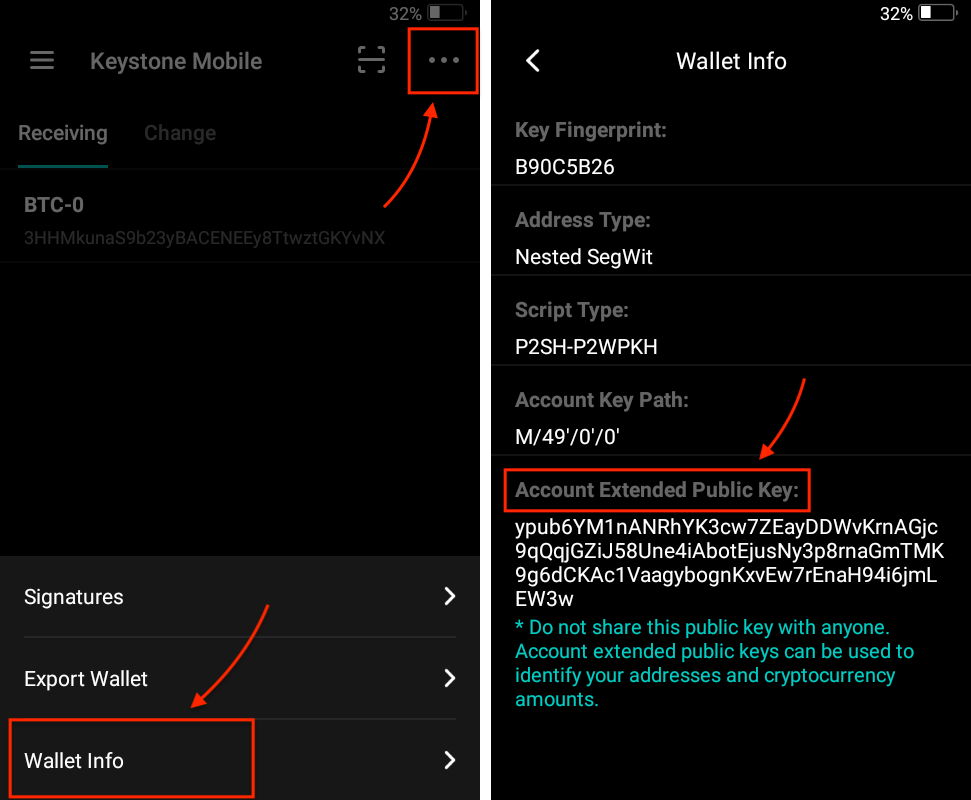
要在 \[Keystone Mobile] 模式下導出 XPU(擴展公鑰),請按照以下步驟操作:
1. 在 \[Keystone Mobile] 模式下點擊 \[我的Keystone]。
2. 點擊右上角的三點圖標。
3. 點擊 \[錢包信息] 將顯示 XPUB。
{% hint style="info" %}
請注意,**\[Keystone Mobile] 模式**只能訪問 **Nested Segwit** 及導出 **ypub**。如果需要導出 **xpub 或 zpub**,則需要更改為適當的模式並重複該過程。
更改模式:點擊菜單鍵進入 \[設置] 頁面,點擊 \[觀察錢包] 進行模式更改。
{% endhint %}
 {% endtab %}
{% tab title="多幣種固件" %}
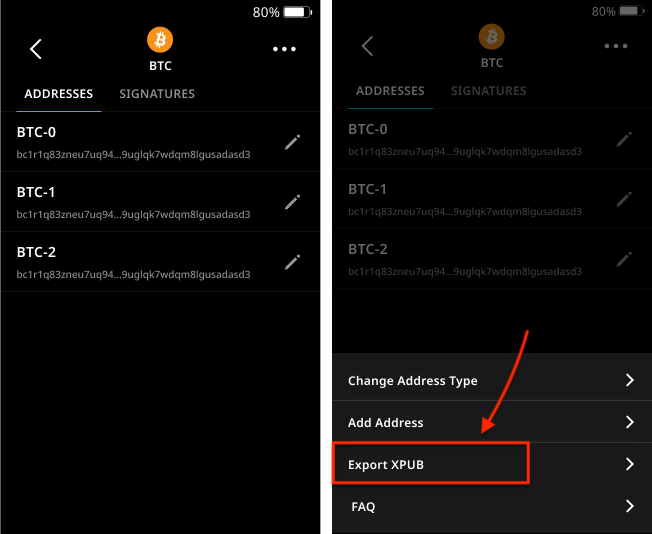
要在【我的資產】頁面導出BTC的xpub(擴展公鑰),請按照以下步驟操作:
1. 點擊【BTC】進入BTC地址頁面。
2. 點擊右上角的三點圖標。
3. 點擊\[導出 XPUB],XPUB將顯示為二維碼,具體詳情如下。
{% hint style="info" %}
請注意,目前只可導出 Native Segwit 地址的 **ypub**。對於 **xpub 和 zpub** 的導出暂不支持。
{% endhint %}
{% endtab %}
{% tab title="多幣種固件" %}
要在【我的資產】頁面導出BTC的xpub(擴展公鑰),請按照以下步驟操作:
1. 點擊【BTC】進入BTC地址頁面。
2. 點擊右上角的三點圖標。
3. 點擊\[導出 XPUB],XPUB將顯示為二維碼,具體詳情如下。
{% hint style="info" %}
請注意,目前只可導出 Native Segwit 地址的 **ypub**。對於 **xpub 和 zpub** 的導出暂不支持。
{% endhint %}
 {% endtab %}
{% endtabs %}
### 三、提示和最佳實踐
1. **切勿與其他任何人共享您的 XPUB,因為它可以訪問您的公共地址。**
2. **小心索取您的 XPUB 或其他敏感信息的網絡釣魚企圖或詐騙。**
{% endtab %}
{% endtabs %}
### 三、提示和最佳實踐
1. **切勿與其他任何人共享您的 XPUB,因為它可以訪問您的公共地址。**
2. **小心索取您的 XPUB 或其他敏感信息的網絡釣魚企圖或詐騙。**